Imports system.io
Public Class Form1
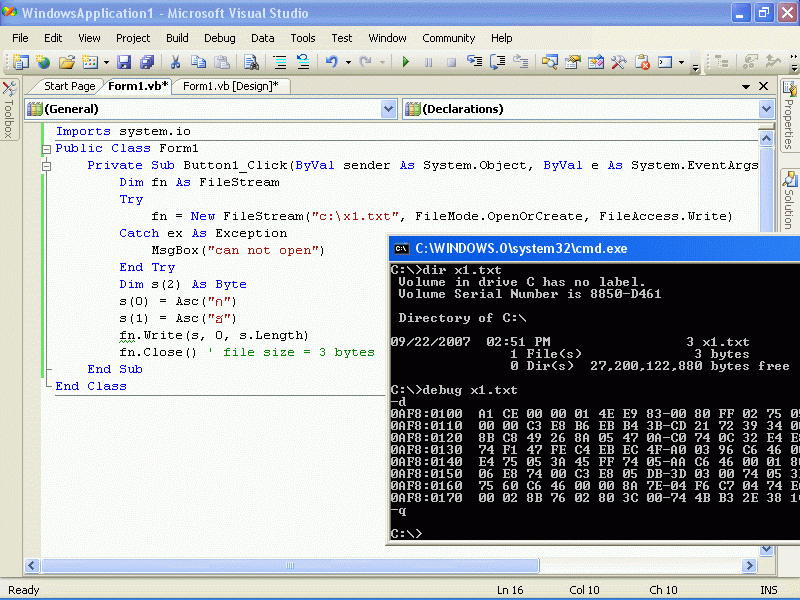
    Private Sub Button1_Click(ByVal sender As System.Object, ByVal e As System.EventArgs) Handles Button1.Click
        Dim fn As FileStream
        Try
            fn = New FileStream("c:\x1.txt", FileMode.OpenOrCreate, FileAccess.Write)
        Catch ex As Exception
            MsgBox("can not open")
        End Try
        Dim s(2) As Byte
        s(0) = Asc("ก")
        s(1) = Asc("ฮ")
        fn.Write(s, 0, s.Length)
        fn.Close() ' file size = 3 bytes
    End Sub
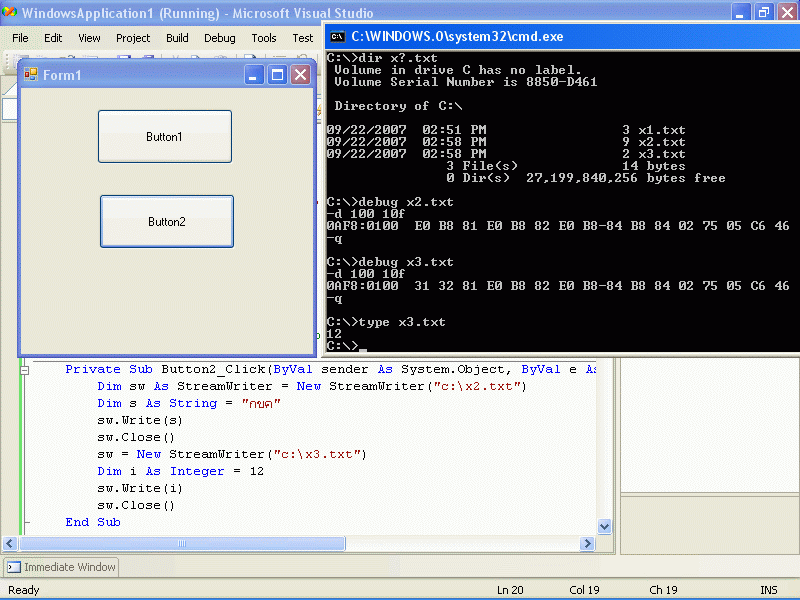
    Private Sub Button2_Click(ByVal sender As System.Object, ByVal e As System.EventArgs) Handles Button2.Click
        Dim sw As StreamWriter = New StreamWriter("c:\x2.txt")
        Dim s As String = "กขค"
        sw.Write(s)
        sw.Close()
        sw = New StreamWriter("c:\x3.txt") '("",false,Encoding.GetEncoding("windows-874"))
        Dim i As Integer = 12
        sw.Write(i)
        sw.Close()
    End Sub
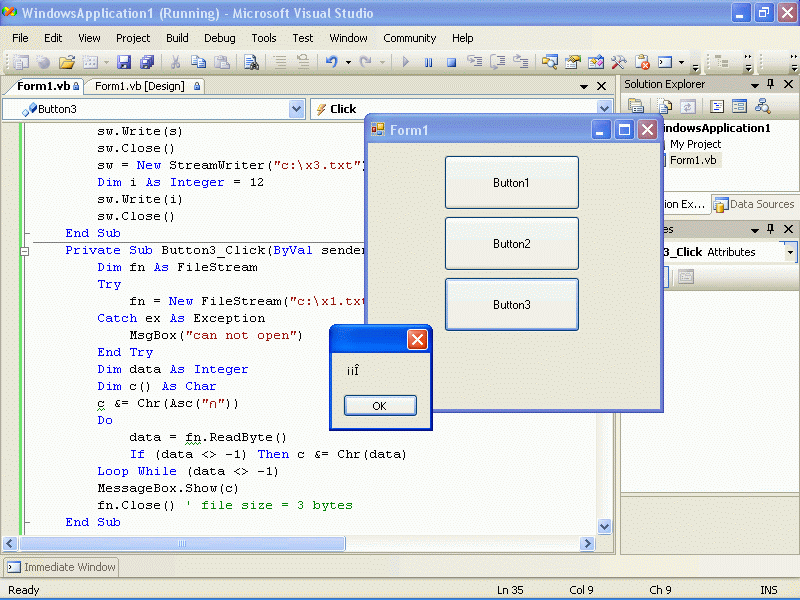
    Private Sub Button3_Click(ByVal sender As System.Object, ByVal e As System.EventArgs) Handles Button3.Click
        Dim fn As FileStream
        Try
            fn = New FileStream("c:\x1.txt", FileMode.Open)
        Catch ex As Exception
            MsgBox("can not open")
        End Try
        Dim data As Integer
        Dim c() As Char
        c &= Chr(Asc("ก"))
        Do
            data = fn.ReadByte()
            If (data <> -1) Then c &= Chr(data)
        Loop While (data <> -1)
        MessageBox.Show(c)
        fn.Close() ' file size = 3 bytes
    End Sub
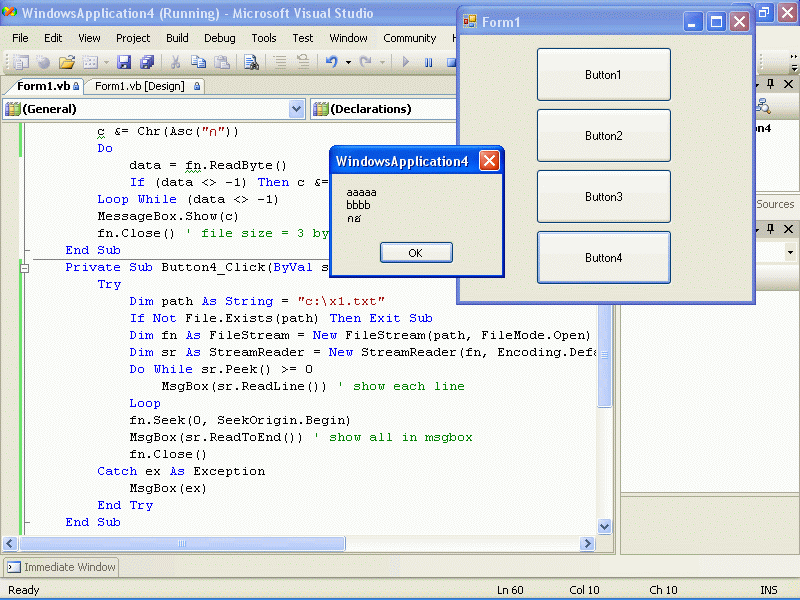
    Private Sub Button4_Click(ByVal sender As System.Object, ByVal e As System.EventArgs) Handles Button4.Click
        Try
            Dim path As String = "c:\x1.txt"
            If Not File.Exists(path) Then Exit Sub
            Dim fn As FileStream = New FileStream(path, FileMode.Open)
            Dim sr As StreamReader = New StreamReader(fn, Encoding.Default)
            Do While sr.Peek() >= 0
                MsgBox(sr.ReadLine()) ' show each line
            Loop
            fn.Seek(0, SeekOrigin.Begin)
            MsgBox(sr.ReadToEnd()) ' show all in msgbox
            fn.Close()
        Catch ex As Exception
            MsgBox(ex)
        End Try
    End Sub
End Class
|
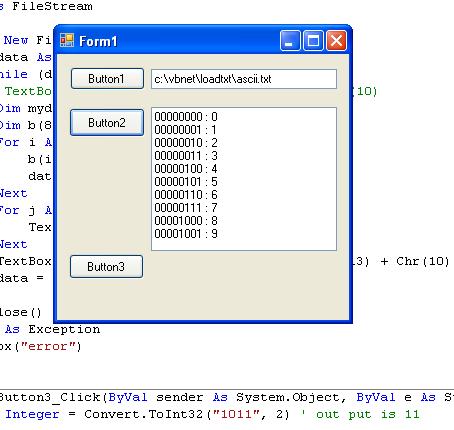 loadtxt.zip
Imports system.io
Public Class Form1
Private Sub Form1_Load(ByVal sender As System.Object, ByVal e As System.EventArgs) Handles MyBase.Load
mystart()
End Sub
Private Sub mystart()
TextBox1.Text = "c:\vbnet\loadtxt\ascii.txt"
End Sub
Private Sub Button1_Click(ByVal sender As System.Object, ByVal e As System.EventArgs) Handles Button1.Click
Dim fn As FileStream
Try
fn = New FileStream(TextBox1.Text, FileMode.OpenOrCreate, FileAccess.Write)
For i As Integer = 0 To 255
Dim s() As Byte = {i}
fn.Write(s, 0, 1)
Next
fn.Close()
MsgBox("ok")
Catch ex As Exception
MsgBox("error")
End Try
End Sub
Private Sub Button2_Click(ByVal sender As System.Object, ByVal e As System.EventArgs) Handles Button2.Click
Dim fn As FileStream
Try
fn = New FileStream(TextBox1.Text, FileMode.Open)
Dim data As Integer = fn.ReadByte()
Do While (data <> -1)
'TextBox2.Text += CStr(data) + Chr(13) + Chr(10)
Dim mydata As Integer = data
Dim b(8) As Byte
For i As Integer = 0 To 7
b(i) = data Mod 2
data = (data - b(i)) / 2
Next
For j As Integer = 0 To 7
TextBox2.Text += CStr(b(7 - j))
Next
TextBox2.Text += " : " + CStr(mydata) + Chr(13) + Chr(10)
data = fn.ReadByte()
Loop
fn.Close()
Catch ex As Exception
MsgBox("error")
End Try
End Sub
Private Sub Button3_Click(ByVal sender As System.Object, ByVal e As System.EventArgs) Handles Button3.Click
Dim i As Integer = Convert.ToInt32("1011", 2) ' out put is 11
MsgBox(i)
End Sub
End Class loadtxt.zip
Imports system.io
Public Class Form1
Private Sub Form1_Load(ByVal sender As System.Object, ByVal e As System.EventArgs) Handles MyBase.Load
mystart()
End Sub
Private Sub mystart()
TextBox1.Text = "c:\vbnet\loadtxt\ascii.txt"
End Sub
Private Sub Button1_Click(ByVal sender As System.Object, ByVal e As System.EventArgs) Handles Button1.Click
Dim fn As FileStream
Try
fn = New FileStream(TextBox1.Text, FileMode.OpenOrCreate, FileAccess.Write)
For i As Integer = 0 To 255
Dim s() As Byte = {i}
fn.Write(s, 0, 1)
Next
fn.Close()
MsgBox("ok")
Catch ex As Exception
MsgBox("error")
End Try
End Sub
Private Sub Button2_Click(ByVal sender As System.Object, ByVal e As System.EventArgs) Handles Button2.Click
Dim fn As FileStream
Try
fn = New FileStream(TextBox1.Text, FileMode.Open)
Dim data As Integer = fn.ReadByte()
Do While (data <> -1)
'TextBox2.Text += CStr(data) + Chr(13) + Chr(10)
Dim mydata As Integer = data
Dim b(8) As Byte
For i As Integer = 0 To 7
b(i) = data Mod 2
data = (data - b(i)) / 2
Next
For j As Integer = 0 To 7
TextBox2.Text += CStr(b(7 - j))
Next
TextBox2.Text += " : " + CStr(mydata) + Chr(13) + Chr(10)
data = fn.ReadByte()
Loop
fn.Close()
Catch ex As Exception
MsgBox("error")
End Try
End Sub
Private Sub Button3_Click(ByVal sender As System.Object, ByVal e As System.EventArgs) Handles Button3.Click
Dim i As Integer = Convert.ToInt32("1011", 2) ' out put is 11
MsgBox(i)
End Sub
End Class
|
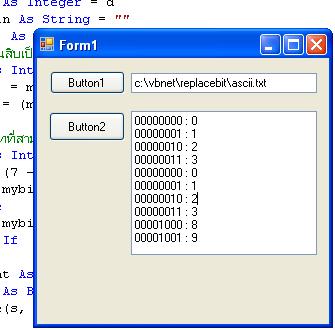 replacebit.zip
Imports system.io
Public Class Form1
Private Sub Form1_Load(ByVal sender As System.Object, ByVal e As System.EventArgs) Handles MyBase.Load
mystart()
End Sub
Private Sub mystart()
TextBox1.Text = "c:\vbnet\replacebit\ascii.txt"
End Sub
Private Sub Button1_Click(ByVal sender As System.Object, ByVal e As System.EventArgs) Handles Button1.Click
Dim fn As FileStream
Try
fn = New FileStream(TextBox1.Text, FileMode.OpenOrCreate, FileAccess.Write)
For d As Integer = 0 To 255
Dim myd As Integer = d
Dim mybin As String = ""
Dim b(8) As Byte
' แปลงฐานสิบเป็นฐานสอง
For i As Integer = 0 To 7
b(i) = myd Mod 2
myd = (myd - b(i)) / 2
Next
' สำหรับบิทที่สามให้เขียน 0 ลงไป
For j As Integer = 0 To 7
If ((7 - j) = 2) Then
mybin += "0"
Else
mybin += CStr(b(7 - j))
End If
Next
Dim myint As Integer = Convert.ToInt32(mybin, 2)
Dim s() As Byte = {myint}
fn.Write(s, 0, 1)
Next
fn.Close()
MsgBox("ok")
Catch ex As Exception
MsgBox("error")
End Try
End Sub
Private Sub Button2_Click(ByVal sender As System.Object, ByVal e As System.EventArgs) Handles Button2.Click
Dim fn As FileStream
Try
fn = New FileStream(TextBox1.Text, FileMode.Open)
Dim data As Integer = fn.ReadByte()
Do While (data <> -1)
Dim mydata As Integer = data
Dim b(8) As Byte
For i As Integer = 0 To 7
b(i) = data Mod 2
data = (data - b(i)) / 2
Next
For j As Integer = 0 To 7
TextBox2.Text += CStr(b(7 - j))
Next
TextBox2.Text += " : " + CStr(mydata) + Chr(13) + Chr(10)
data = fn.ReadByte()
Loop
fn.Close()
Catch ex As Exception
MsgBox("error")
End Try
End Sub
End Class replacebit.zip
Imports system.io
Public Class Form1
Private Sub Form1_Load(ByVal sender As System.Object, ByVal e As System.EventArgs) Handles MyBase.Load
mystart()
End Sub
Private Sub mystart()
TextBox1.Text = "c:\vbnet\replacebit\ascii.txt"
End Sub
Private Sub Button1_Click(ByVal sender As System.Object, ByVal e As System.EventArgs) Handles Button1.Click
Dim fn As FileStream
Try
fn = New FileStream(TextBox1.Text, FileMode.OpenOrCreate, FileAccess.Write)
For d As Integer = 0 To 255
Dim myd As Integer = d
Dim mybin As String = ""
Dim b(8) As Byte
' แปลงฐานสิบเป็นฐานสอง
For i As Integer = 0 To 7
b(i) = myd Mod 2
myd = (myd - b(i)) / 2
Next
' สำหรับบิทที่สามให้เขียน 0 ลงไป
For j As Integer = 0 To 7
If ((7 - j) = 2) Then
mybin += "0"
Else
mybin += CStr(b(7 - j))
End If
Next
Dim myint As Integer = Convert.ToInt32(mybin, 2)
Dim s() As Byte = {myint}
fn.Write(s, 0, 1)
Next
fn.Close()
MsgBox("ok")
Catch ex As Exception
MsgBox("error")
End Try
End Sub
Private Sub Button2_Click(ByVal sender As System.Object, ByVal e As System.EventArgs) Handles Button2.Click
Dim fn As FileStream
Try
fn = New FileStream(TextBox1.Text, FileMode.Open)
Dim data As Integer = fn.ReadByte()
Do While (data <> -1)
Dim mydata As Integer = data
Dim b(8) As Byte
For i As Integer = 0 To 7
b(i) = data Mod 2
data = (data - b(i)) / 2
Next
For j As Integer = 0 To 7
TextBox2.Text += CStr(b(7 - j))
Next
TextBox2.Text += " : " + CStr(mydata) + Chr(13) + Chr(10)
data = fn.ReadByte()
Loop
fn.Close()
Catch ex As Exception
MsgBox("error")
End Try
End Sub
End Class
|
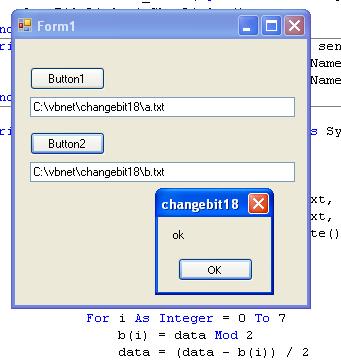 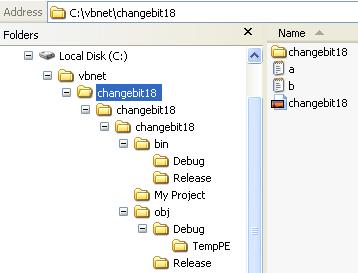 changebit18.zip
Imports system.io
Public Class Form1
Private Sub Button1_Click(ByVal sender As System.Object, ByVal e As System.EventArgs) Handles Button1.Click
OpenFileDialog1.ShowDialog()
End Sub
Private Sub OpenFileDialog1_FileOk(ByVal sender As System.Object, ByVal e As System.ComponentModel.CancelEventArgs) Handles OpenFileDialog1.FileOk
TextBox1.Text = OpenFileDialog1.FileName
TextBox2.Text = OpenFileDialog1.FileName
End Sub
Private Sub Button2_Click(ByVal sender As System.Object, ByVal e As System.EventArgs) Handles Button2.Click
Dim fni As FileStream
Dim fno As FileStream
Try
fni = New FileStream(TextBox1.Text, FileMode.Open)
fno = New FileStream(TextBox2.Text, FileMode.OpenOrCreate, FileAccess.Write)
Dim data As Integer = fni.ReadByte()
Dim mybin As String
Dim b(8) As Byte
Do While (data <> -1)
mybin = ""
For i As Integer = 0 To 7
b(i) = data Mod 2
data = (data - b(i)) / 2
Next
For j As Integer = 0 To 7
If ((7 - j) = 2) Then
mybin += "0"
Else
mybin += CStr(b(7 - j))
End If
Next
Dim myint As Integer = Convert.ToInt32(CStr(mybin), 2)
Dim s() As Byte = {myint}
fno.Write(s, 0, 1)
data = fni.ReadByte()
Loop
fni.Close()
fno.Close()
MsgBox("ok")
Catch ex As Exception
MsgBox("error")
End Try
End Sub
End Class changebit18.zip
Imports system.io
Public Class Form1
Private Sub Button1_Click(ByVal sender As System.Object, ByVal e As System.EventArgs) Handles Button1.Click
OpenFileDialog1.ShowDialog()
End Sub
Private Sub OpenFileDialog1_FileOk(ByVal sender As System.Object, ByVal e As System.ComponentModel.CancelEventArgs) Handles OpenFileDialog1.FileOk
TextBox1.Text = OpenFileDialog1.FileName
TextBox2.Text = OpenFileDialog1.FileName
End Sub
Private Sub Button2_Click(ByVal sender As System.Object, ByVal e As System.EventArgs) Handles Button2.Click
Dim fni As FileStream
Dim fno As FileStream
Try
fni = New FileStream(TextBox1.Text, FileMode.Open)
fno = New FileStream(TextBox2.Text, FileMode.OpenOrCreate, FileAccess.Write)
Dim data As Integer = fni.ReadByte()
Dim mybin As String
Dim b(8) As Byte
Do While (data <> -1)
mybin = ""
For i As Integer = 0 To 7
b(i) = data Mod 2
data = (data - b(i)) / 2
Next
For j As Integer = 0 To 7
If ((7 - j) = 2) Then
mybin += "0"
Else
mybin += CStr(b(7 - j))
End If
Next
Dim myint As Integer = Convert.ToInt32(CStr(mybin), 2)
Dim s() As Byte = {myint}
fno.Write(s, 0, 1)
data = fni.ReadByte()
Loop
fni.Close()
fno.Close()
MsgBox("ok")
Catch ex As Exception
MsgBox("error")
End Try
End Sub
End Class
|
|