ขั้นตอนการนำไปใช้
1. Download : pro_ajja.zip ประกอบด้วย 2 แฟ้ม
- DBS.mdb
- dbStudent.java
2. หน้าที่ของโปรแกรม dbStudent.java
- ค้นหาระเบียน ตามเลขระเบียนที่ส่งเข้าไป ด้วยปุ่ม Find
- ล้างข้อมูลเดิมได้ด้วยปุ่ม Clear
- เลิกการทำงาน ด้วยปุ่ม Exit
3. ต้อง เพิ่ม ODBC ชื่อ DBS
- Setting, Control Panel, Administrative Tools, Data Sources (ODBC)
- User DSN, Add, Driver do Microsoft Access, Select, c:\DBS.mdb
- ช่อง Data Source Name ใส่ DBS แล้ว ok
4. แปลโปรแกรม และประมวลผล
- javac dbStudent.java
- java dbStudent
5. ผลลัพธ์ที่ได้
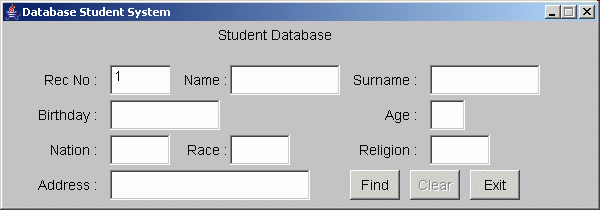 6. method ใน Class dbStudent ประกอบด้วย
- public static void main (String[] args)
- void init()
- public void actionPerformed (ActionEvent e)
- public dbStudent () เป็น constructor เชื่อมต่อฐานข้อมูล
- public void findByID (String idnum)
- void clearText ()
- public void setEnableField (boolean id,boolean n,boolean sn,boolean bd,
boolean age,boolean nat,boolean rac,boolean rel,boolean add)
99. FAQs
- extends คือ การสืบทอดสิ่งที่เขาสร้างไว้แล้ว และนำมาใช้ได้ทันที
- class แบบ interface จะใช้คำว่า implements สืบทอดไป
- interface class คือ class ที่เตรียมไว้ให้ class อื่น ๆ เข้ามาติดต่อ แต่ไม่มีกิจกรรมแน่นอน
- abstract class คือ class ที่เตรียมไว้ให้ class อื่น หรือให้ class อื่น overriding ได้
interface a {
int bb = 10;
public void show();
public int i();
}
class c implements a {
public void show() {
System.out.println("show");
}
public int i() { return (bb + 5); }
}
public class x {
public static void main (String args[]) {
c aaa = new c();
aaa.show();
System.out.println(aaa.i());
}
}
// Result of this program
// show
// 15
http://jarticles.com/tutorials/servlet/intro_servlet.html
|

